
Resumes & CVs
Your resume is your introduction to an employer. It presents a snapshot of your work and educational experiences tailored specifically to the role you are applying to. You will decide what should be included based on the job/internship description and employer needs.
Resumes have their own particular language that you’ll need to learn. Employers will scan your resume rather than read it carefully, so you want to present your information quickly and with maximum impact.
What is a Resume?
In the United States, a resume is a one-page overview of your experiences and skills that are relevant to a particular job position. It is a key part of any job or internship application. Your resume lets a potential employer see what you’ve done in the past in order to understand how you meet the requirements for their position. The goal of a good resume is to lead to an interview you.
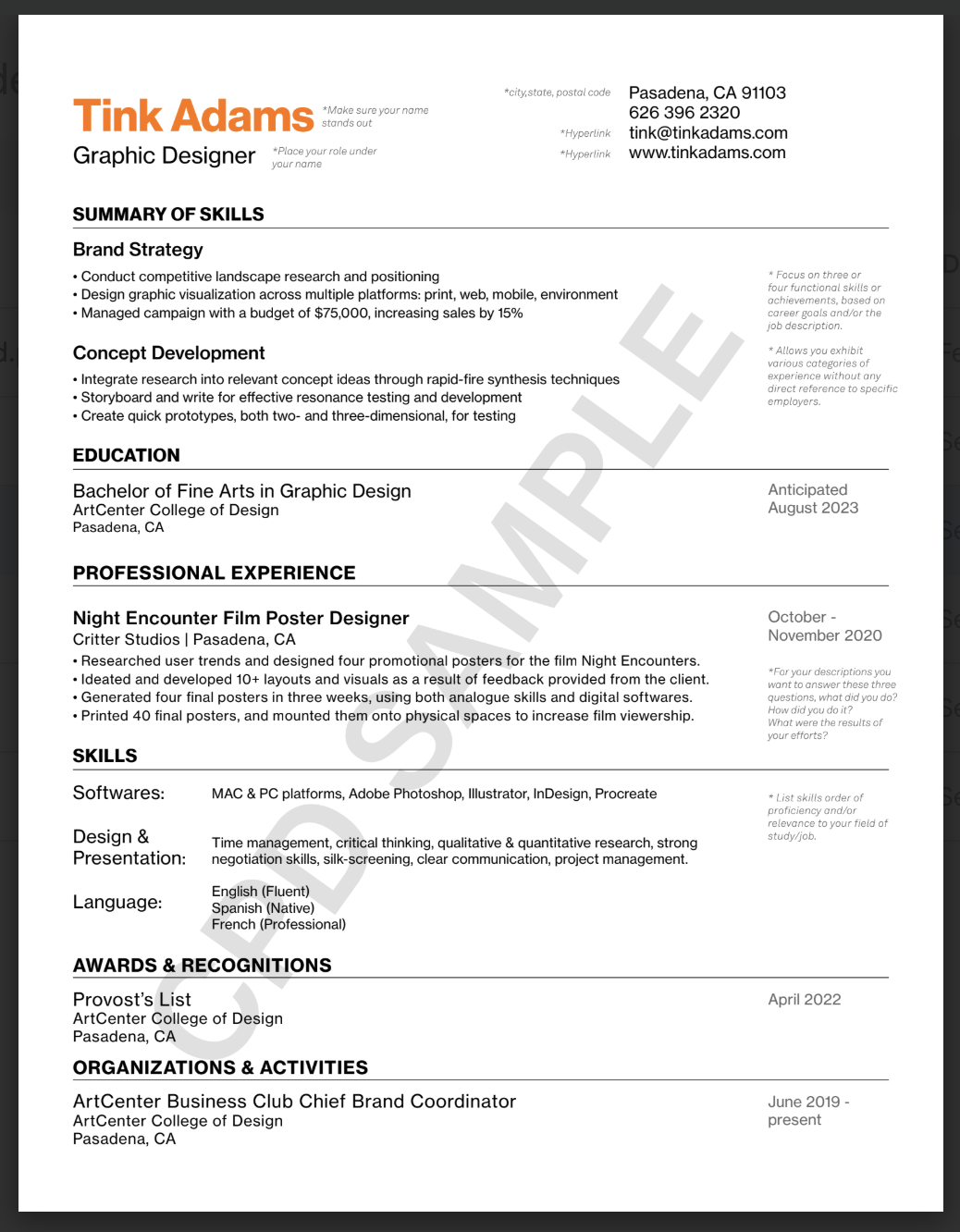
A resume should present your experiences and background in an easy-to-digest format. List your experiences in sets of bullet points that show what you did, how you did it, and the result or outcome.
Types of Resumes
There are multiple types of resumes that are appropriate at the different stages of your creative career. In the United States, there is a clear difference between a resume and a CV (Curriculum Vitae). In Europe, both terms are used for what Americans call a resume.
-
A professional resume is the one you will submit to internship and job applications. It should offer employers a quick overview of your relevant skills, employment history, educational background, and accomplishments. Based on this information, they can then make an informed decision about whether or not they want to interview or hire you.
A reverse chronological resume format is the most common for a professional resume. It begins with your most recent work/project experiences at the top of the page and continues backwards in time.
Other professional resume formats you may encounter are the chrono-functional resume and the functional resume.
-
When applying to exhibitions, residencies, grants, or art awards, you will likely need to apply with an artist’s resume. Depending on the particular job and field of interest, artist’s resumes will highlight a number of skills and include sections that are not present in a standard or professional resume.
An artist resume may include the following:
—Bibliography: Includes articles on your work, media interviews, and reviews of your artwork
—Exhibitions: List the exhibitions you have participated in along with details such as the name of the exhibit, place, and space. You can divide this section into separate categories such as group shows, solo shows, and juried exhibitions
—Collections: This section can be divided into corporate collections, private collections, and permanent public collections. Seek permission before referencing the name of the private owner of your work in your resume
—Publications, Productions, Shows: For authors and performing artists, you may include a list of your publications, productions, and performances
-
A CV (or Curriculum Vitae) is an overview of all of your professional achievements. In the United States, CVs may be used when applying for gallery shows, residencies, grants, graduate school, and teaching positions. Unlike a resume, a CV can stretch to many pages, depending on your experience, and it will continue to grow with your career. You will customize your CV to highlight your most relevant achievements for each type of application.
-
A master resume is a document that functions as a source to help you create other resumes. This document lists all of your skills and experiences in one place so that you can later choose relevant information to tailor your professional resume for each position you are applying for, then copy and paste it directly into the professional resume you are tailoring. For example you may list all of your Course Projects in your master resume, though only 2-3 of those projects are relevant to the role your applying for
Continuously updating your master resume will help you keep track of all your experiences and will help save you time during the application process. It is not meant to serve as a template and is not meant to be submitted for a job application.
ATS-Friendly vs. Non-ATS Resumes
An Application Tracking System (ATS) is software that helps a hiring company organize job applications and optimize the recruiting process. In short, an ATS automatically collects and organizes applications for a company’s open positions and can be used to scan submitted resumes for the keywords listed in the job/internship posting to help recruiters understand which applications are the best fit for the role. If you are uploading your resume through an employer’s website or a job board site (though not ArtCenter Connect), chances are good that your resume will be scanned by an ATS before it is seen by a person. You could be eliminated from consideration if the software doesn’t pick up the right keywords in your resume.
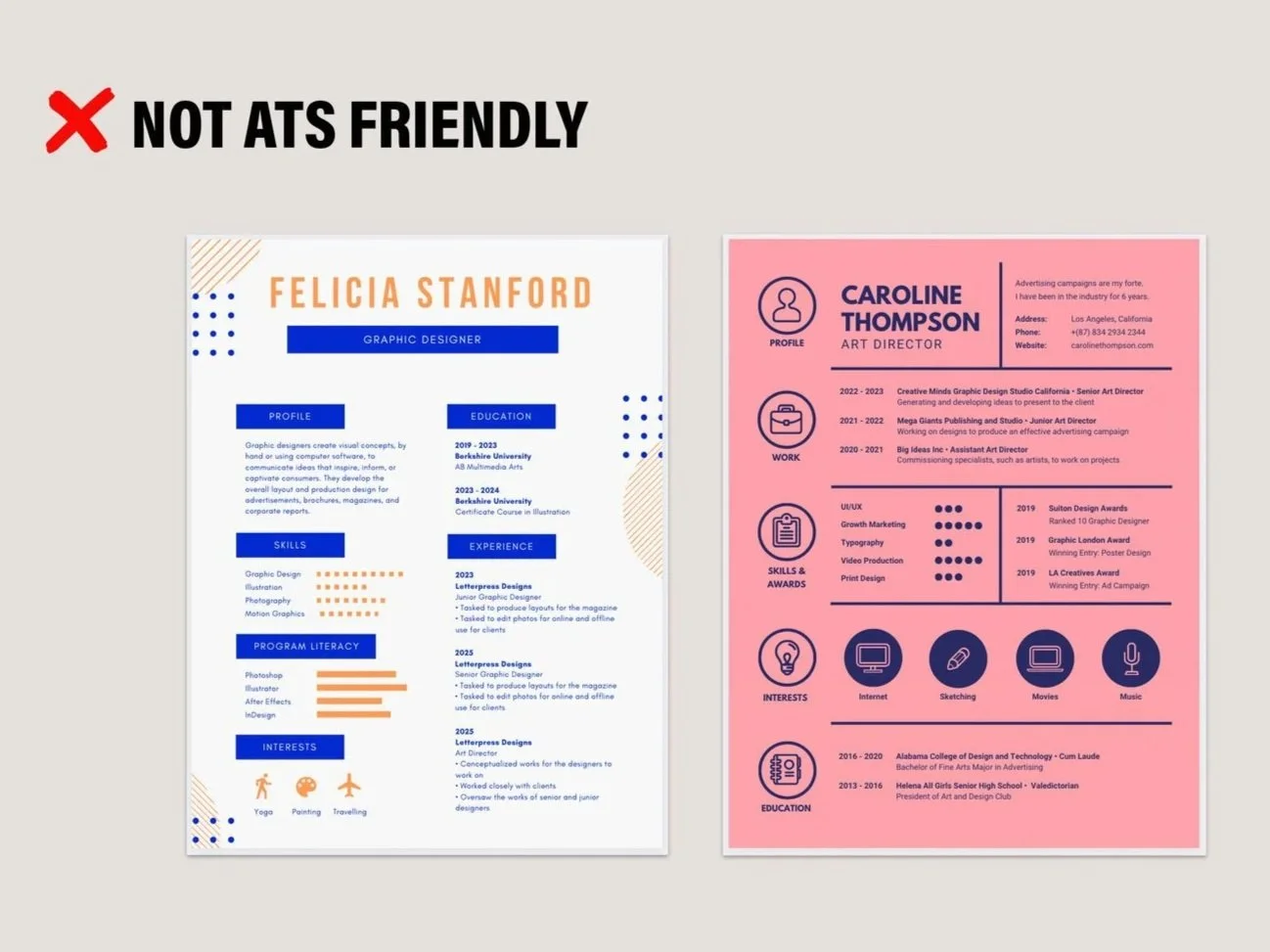
ATS tools work best with plain text documents and can have a more difficult time pulling information from highly-designed documents. As an artist or designer, you may want to have two versions of your resume, one which is optimized for ATS software and one that contains the design elements you prefer. Below you will see the types of design elements (multiple columns of text, graphics, etc.) that can be difficult for ATS to read.
US Resumes vs International Resumes
Resumes and CVs differ around the world so it’s important to research the resume norms of the country where you’re applying before submitting your application. GoinGlobal is one resource for this research. Below you will find common differences in resumes, but the most important things to note about US resumes are that they do not include personal information such as age and marital status, and they do not include photos.

Highlighting Your Experience
Use our resume checklist to make sure your resume meets all the key criteria.
You can also use software like SkillSyncer to optimize your resume for a specific job or internship application. Skillsyncer is a tool you have access to for free as an ArtCenter student - just use your ArtCenter email address when registering to access the free version.
Formatting Your Resume
-
Ensure that your resume is polished and easy to read.
Fill one page with out overcrowding. If you have a great deal of experience (graduate students, alumni, career changers) it is fine if the resume continues onto a second page
Use acceptable margins, minimum 1” on each side (including top and bottom) of the page
Use a font style and size that is readable (10-12pt)
Use consistent formatting (including for dates) throughout
Place the most relevant information at the top half of the page
Ensure that section headings reflect the content, and content supports headings
Tailor to the internship, job or program you are applying to
Include titles and descriptions that are relevant to the targeted opportunity
-
Ensure that your resume is polished and ready to submit to the hiring manager. Hiring managers may reject resumes for simple errors as they demonstrate lack of attention to detail.
Spelling, punctuation, and spacing should be error-free
Verb tenses should be used correctly. Use past tense for previous experiences and present tense for current/ongoing experiences
Pronouns should be used correctly
No other grammar errors should be present
-
Ensure a recruiter can easily reach out to you. Make sure you are checking the phone number and email address on your resume.
Include the name you want to use professionally, which should match your portfolio website and LinkedIn profile
Make sure your name stands out and is legible
Include the city, state, and zip code of your residence if within the United States
Do not include your street address
Include your phone number
List your professional email and hyperlink it. Make sure that this is an email address you check regularly
Provide your portfolio website and hyperlink it
Guide to Writing Great Bullet Points
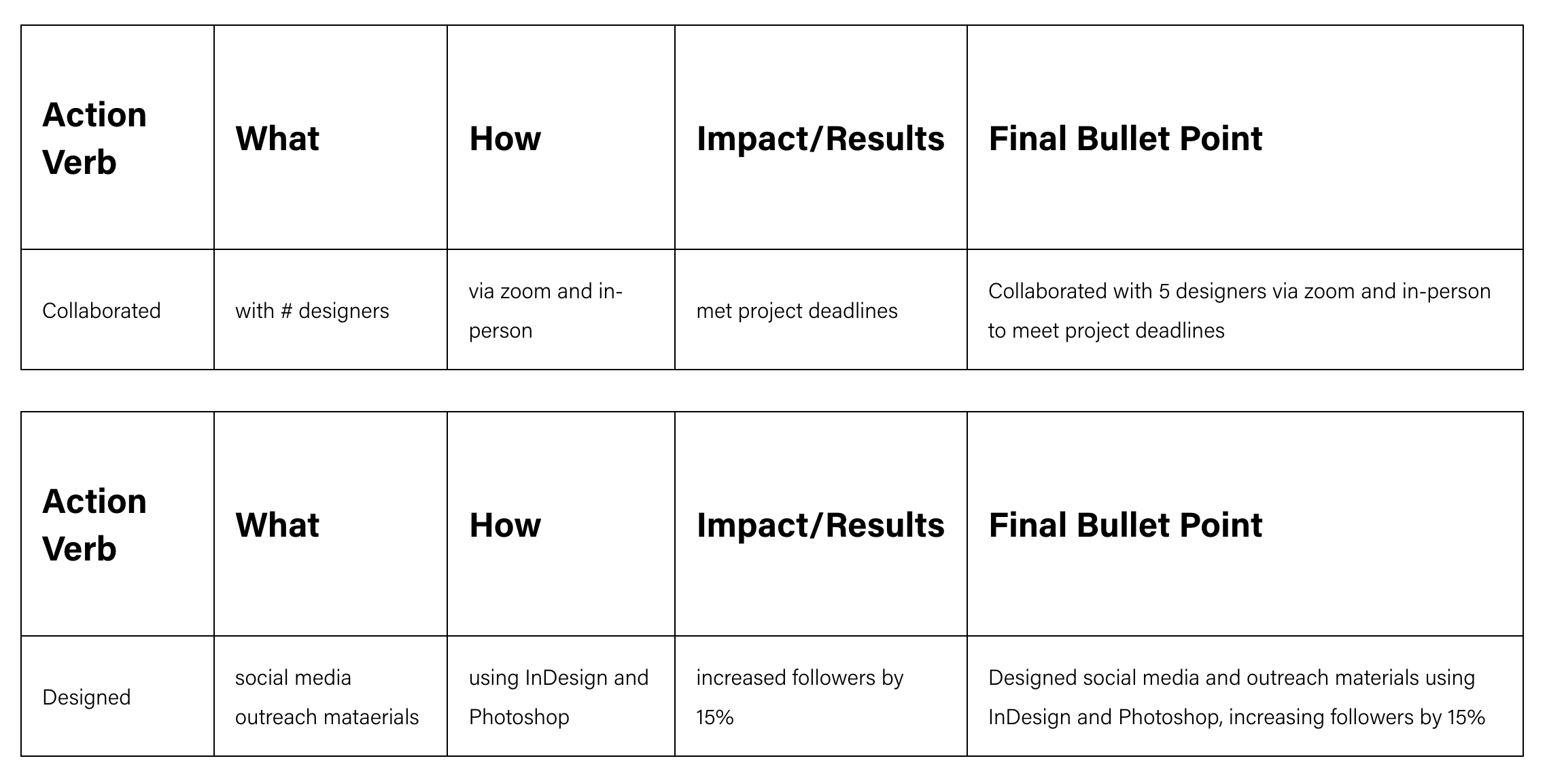
This basic formula will help you write effective bullet points for your experiences that show the reader what you can do by describing what you did, how you did it, and the outcome. Put this information in this order: action verb, what, how, impact/results. We have a list of action words to help you with this process.
References
Only include references at the request of the employer. If references are requested, they should be in a separate document with a heading that matches your resume, website, logo, etc.
Choose references wisely, and always ask your references for permission prior to listing them. Select people who know you well and will give a good reference.
Always let them know what position you are applying to, and send them a copy of the job description and your resume for their information
References should be formatted to include the following information: First and Last Name, Company Name, professional title, professional email address and direct phone number
Dos & Don’ts
-
Tailor your resume to each specific position and organization
Have a clickable link to your website portfolio
Proofread, proofread, proofread! Do not rely on spell check and grammar check. Pay special attention to your phone number, email address, and website. Share your resume with friends, mentors, industry colleagues or the Writing Center for proofreading and feedback
Keep the resume to one page (CVs and resumes for senior-level positions may be longer)
Be honest. Most of what is on a resume will be reviewed during an interview
-
Include personal information such as marital status, birth date, reasons for leaving previous positions, or photographs
List salary requirements. In California, companies must share a salary range for a position, and they cannot ask you for your previous or current pay. Discuss salary after you have an offer
List references or other contacts. Do not say “references available upon request”